
“Why is my business not showing on Google Maps?” is the question we are asked more than any other. The answer is usually one of about six things, and most businesses spend months working on the wrong one. Getting into the Google Maps local pack starts with ruling out faults, not with building content.
This guide works through the checks in order of how often they turn out to be the cause, how to test properly, and what to do when the honest answer is that your competitor simply has four hundred reviews. For the full tactical picture, see our Delhi NCR local SEO guide.
First, test it properly
Before diagnosing anything, make sure the problem is real. Checking the Google Maps local pack from your own office, logged into your own account, tells you almost nothing — Google personalises results heavily, and your proximity to your own premises distorts everything.
The Google Maps local pack changes street by street. A business can hold position two at the end of its own road and be invisible three kilometres away, and both are normal. Test in an incognito window, and ideally from a different physical location, before concluding anything is wrong.
Ask what query you actually care about, too. Appearing in the Google Maps local pack for your own business name is not the same as ranking for “dentist near me”, and only the second one brings new customers.
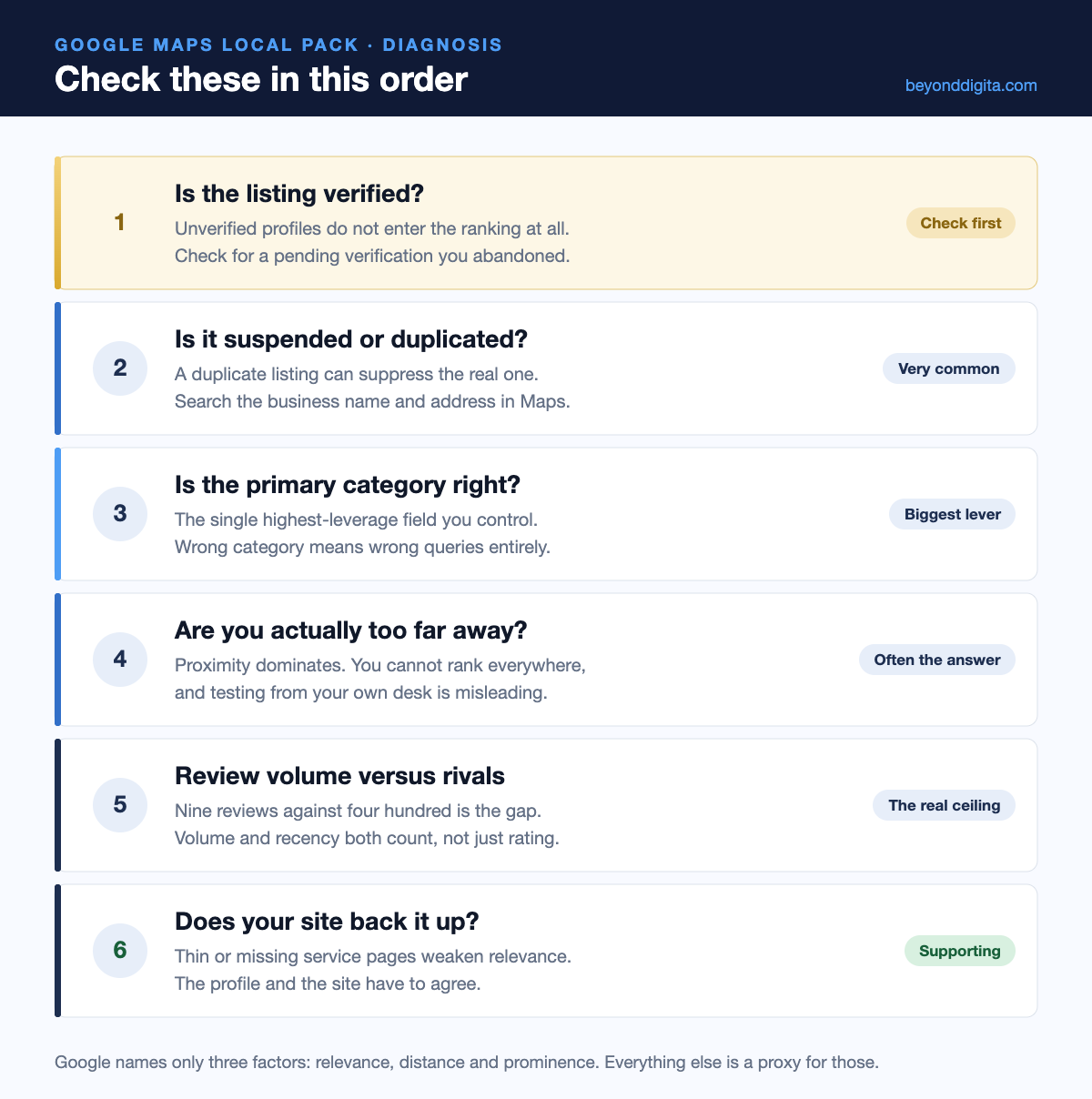
The six checks, in order
1. Verification
An unverified profile does not compete at all. This sounds obvious, yet abandoned verifications are common — a postcard never arrived, a video call was missed, and the listing has sat unverified ever since. No amount of work gets an unverified listing into the Google Maps local pack.
2. Suspension or duplicates
Search your business name and address directly in Maps. Duplicates keep more businesses out of the Google Maps local pack than any content problem. If two listings appear, one is suppressing the other. Duplicates usually come from an old listing created by a previous agency, a former address, or Google generating one automatically. Merge or remove the duplicate before anything else.
3. Primary category
One field, chosen in a minute, that determines most of what you are eligible to rank for. “Beauty salon” and “Hair salon” surface for different searches. If your primary category does not match the queries you want, no amount of reviews will place you in that Google Maps local pack.
4. Distance
Often the honest answer. Google states proximity as one of three Google Maps local pack ranking factors, and you cannot change where your business sits. A clinic in Rohini will not appear for searches in Saket, however good its profile is. Google’s Maps help is blunt about this.
5. Review volume and recency
Compare yourself to whoever currently occupies the three Google Maps local pack slots. If they have several hundred reviews and you have nine, that gap is the explanation. Volume matters, recency matters, and a steady flow beats a burst, as our South Delhi clients consistently find — the methods are in our guide to getting more Google reviews.
6. Website support
The profile does not carry the Google Maps local pack alone. Thin service pages, no locality content and markup that contradicts your listing all weaken relevance — the gaps our SEO audits find most often. Your site and your profile need to tell the same story, which is why LocalBusiness schema matters here.
What Google actually says
Three factors, stated publicly: relevance, distance and prominence. Everything any agency tells you about the Google Maps local pack is a proxy for one of those, and Google’s local ranking documentation is worth reading directly rather than through a blog post.
| Factor | What it means | Can you change it? |
|---|---|---|
| Relevance | How well you match the query | Yes — categories, services, content |
| Distance | Where the searcher is standing | No |
| Prominence | How well known you are | Yes — reviews, citations, mentions |
Two of the three Google Maps local pack factors are in your control. That is the whole of local SEO, and any pitch that complicates it further is selling something.
How to track local pack position honestly
A single average position number for local search is close to meaningless, because there is no single position. Any agency reporting one figure for the Google Maps local pack is averaging away the only detail that matters.
What you want instead is a grid: your position measured from a dozen points across the area you serve. That shows the real shape of your visibility — strong within two kilometres, fading by four, absent by six — and makes it obvious whether the work is expanding the radius or merely holding it.
| What to track | Why | How often |
|---|---|---|
| Position by locality | Shows the real reach of your listing | Monthly |
| Direction requests | Intent to physically visit | Monthly |
| Calls from the profile | The clearest commercial signal | Monthly |
| Review count versus top three | The prominence gap in one number | Monthly |
| Profile views and searches | Discovery versus branded split | Quarterly |
The last row is more useful than it looks. Google separates searches that found you by name from those that found you by category, and a healthy Google Maps local pack presence shows the discovery share growing over time. If it stays flat while branded searches rise, your other marketing is working and your local SEO is not.
The hidden cost of a wrong category
It is worth returning to category, because it causes more wasted effort than anything else on the list and is the cheapest thing to fix.
A business set to a broad category competes against every business in it. A business set to a precise one competes against far fewer and matches the query far better. Changing from “Doctor” to “Dermatologist”, or from “Shop” to “Furniture store”, can change which Google Maps local pack you appear in entirely — and the change takes thirty seconds.
Two cautions. Changing the primary category on an established listing can cause a short wobble, so do not do it casually or repeatedly. And never change category at the same time as name or address — multiple simultaneous edits to core fields are a common suspension trigger, as we cover in our profile optimisation guide.
Things that will not get you into the local pack
- Keywords in your business name. A guideline breach and a common suspension trigger. It sometimes works briefly, then the listing disappears.
- Buying reviews. Detected routinely, removed in batches, and a breach of Google’s contribution policies.
- A virtual office or coworking desk. One of the fastest routes to a hard suspension under the representation guidelines.
- Listing more service areas. No ranking effect whatsoever — covered in our service area business guide.
- Posting daily. Weekly Profile Posts help engagement; frequency alone does not move the Google Maps local pack.
- Backlinks alone. They support general rankings far more than map results, where reviews and citations do the work.
When the answer is that you cannot win
Sometimes the honest conclusion is that a particular Google Maps local pack is out of reach. A new clinic two kilometres from the market centre, competing against three practices with a decade of reviews each, is not going to take a top-three slot this year.
That is not a reason to give up; it is a reason to change target. Compete on the queries those rivals ignore — specific treatments, specific localities, specific languages. Winning “paediatric dentist Mayur Vihar” is achievable where “dentist Delhi” is not, and the long tail converts better anyway.
Meanwhile, radius-targeted ads can buy visibility in the exact area you cannot yet earn it, while the reviews accumulate underneath.
Frequently asked questions
How long does it take to enter the local pack?
Fixing a fault — wrong category, duplicate listing — can change your Google Maps local pack position in days. Earning your way in on prominence takes three to six months of consistent review generation.
Why do I rank in one area and not another?
Distance. The Google Maps local pack is recalculated for each searcher’s position, so there is no single ranking — only a map of where you appear and where you do not.
I was there last month and now I am gone
Disappearing from the Google Maps local pack usually follows a suspension, a recent edit to name or category, or a competitor’s review surge. Sudden disappearance usually has a specific cause rather than being a gradual decline.
Does a website matter if I have a profile?
Yes. You can appear in the Google Maps local pack without one, but you will plateau. The site carries relevance signals the profile cannot and is where enquiries actually convert.
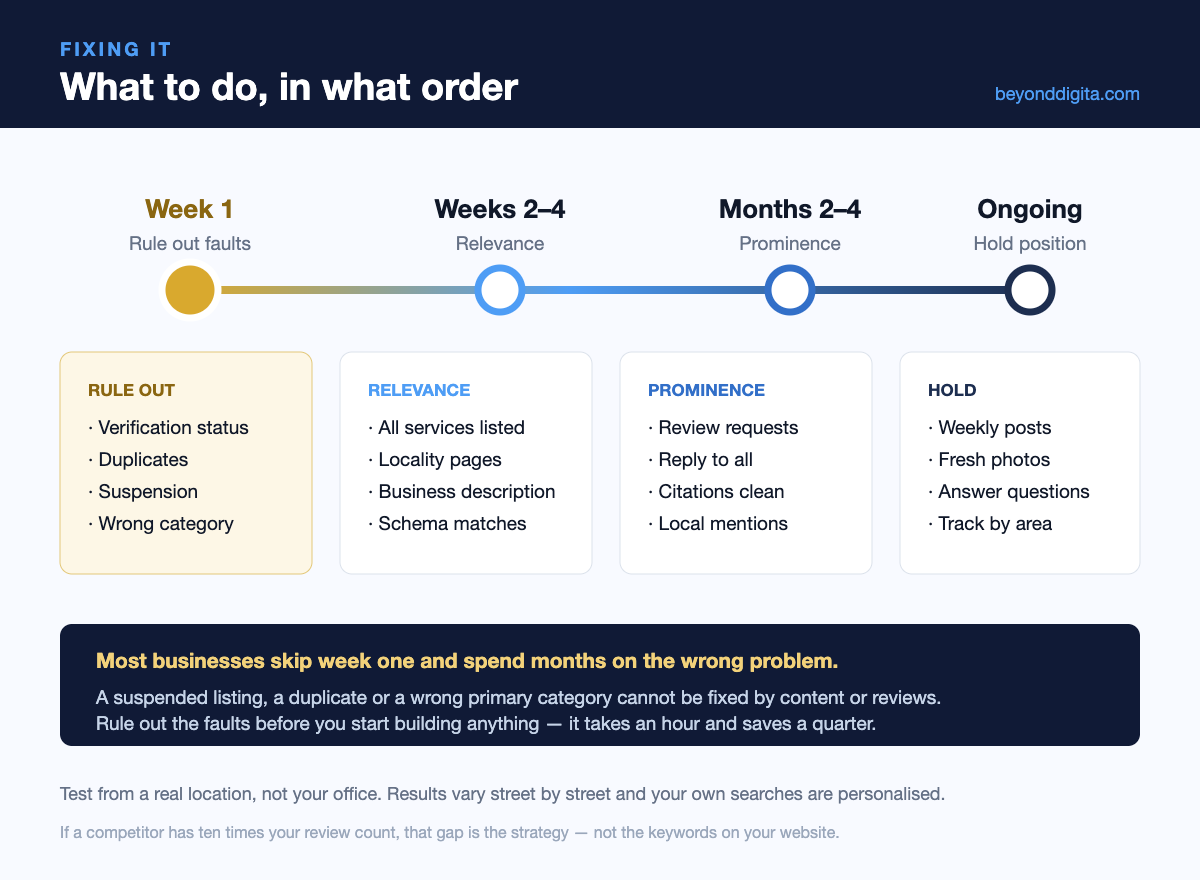
Spend the first hour ruling things out
Most businesses we audit were working hard on the wrong Google Maps local pack problem — building content while a duplicate listing suppressed them, or chasing reviews with the wrong primary category set.
Verification, duplicates and category take an hour to check and explain a large share of Google Maps local pack problems. If you want a second pair of eyes, send us your listing and our local SEO team will tell you which of the six it is — and whether it is worth fixing or worth targeting elsewhere.